 Upload BOM
 Cart (
 Cache Memory in Computer Architecture: Concepts, Design, and Optimization
Author:admin Date: 2026-02-02 04:21 Views:55
Introduction
The Central Processing Unit (CPU) has a low capacity but high-speed memory integrated within it or very close to it, which is called cache memory. The role of cache memory is to store frequently accessed data and, together with instructions, to accelerate the processing speed of a computer system.
Cache memory addresses the performance gap between the fast CPU processing speed and the slow RAM access times. Without having a cache in place, the CPU would spend too much time waiting for data to be retrieved from RAM. This severely limits the system throughput.
Cache memory serves many roles in a computer system. Such include:
- The cache is the first place the CPU checks when it needs data. In case the data is not there, it will fetch it from the system RAM. The CPU then stores the data copy in cache so that it can be used later if needed.
- Cache memory reduces latency. This is because it provides data in nanoseconds. The cache is critical to minimize this delay. This is done by fetching the data from main memory so the CPU can access it with ease.
- You should expect to get separate caches for instructions and data, allowing the CPU to fetch both at the same time. Such improves instruction pipelining.
How System Cache Memory Works
The CPU needs a high-speed buffer to function properly. That is where the cache memory comes in to improve how fast the CPU can access the data.
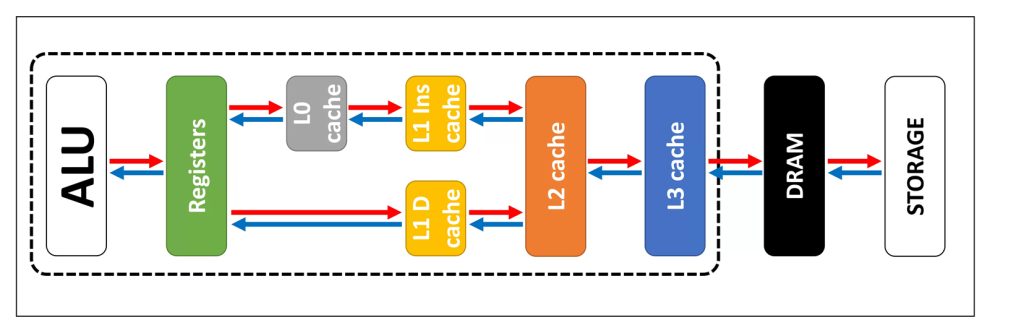
The cache serves as the primary checkpoint for the CPU during data operations. If the required information is located there, the processor accesses it immediately with minimal latency. However, sometimes the data is in the cache. In this case, the CPU will fetch it from the RAM. When the data is delivered to the CPU, it is copied into cache for future use.
The memory hierarchy is organized based on speed, cost, and proximity to the CPU. Here is what to expect.
- CPU and registers are the fastest and smallest storage in the process
- Cache (L1, L2, L3) is a high-speed SRAM integrated into or very near the CPU. This is important to serve as an intermediary to synchronize the processor’s high clock speed.
- Cache memory offers faster performance than RAM, even though the latter functions as the system’s main storage area. It is used for holding active programs, but it cannot match the speed you get with the cache memory.
- Storage (HDD/SSD) is the slowest but largest non-volatile layer. The data must be loaded in RAM before it can be processed or cached.
Cache Memory Architecture
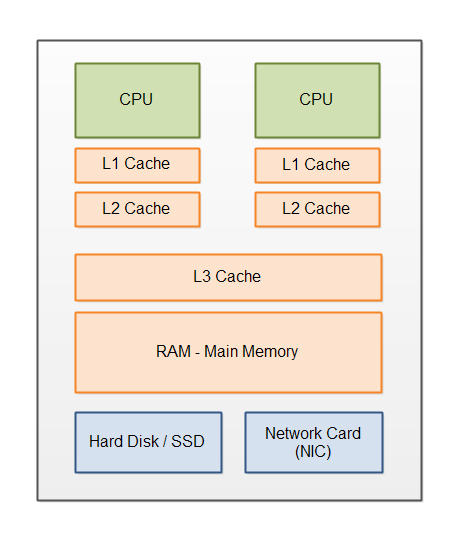
The cache memory architecture is important to define how data is organized, identified, and retrieved in the high-speed buffers. Modern systems use standardized block sizes and hybrid mapping techniques for balancing speed and efficiency.
Cache Line and Block Size
Data is exchanged between the main memory and the cache in fixed-size segments called blocks or cache lines, which represent the minimum transfer size. The standard size is the 64-byte cache line.
The purpose of a cache line or block is to load an entire block rather than a single byte. This ensures the data near the requested address is available for future instructions.
Main Cache Mapping Techniques
To improve cache efficiency and data retrieval speeds, various mapping strategies are used to dictate how data blocks move from the main memory into the cache. The three primary methods are direct-mapped, fully associative, and set-associative.
- Direct-Mapped Cache
In this configuration, every block of main memory is assigned to one specific, predetermined cache line. This is typically calculated using a modulo operation based on the address.
Pros: It is the most straightforward to design and provides the fastest access times.
Cons: It is prone to cache thrashing. This happens when two or more frequently accessed memory blocks compete for the same cache line, constantly evicting one another and lowering performance.
- Fully Associative Cache
This method allows any block of main memory to be placed in any available cache line.
Pros: It offers the highest level of flexibility and significantly reduces the miss rate because a block is evicted only when the entire cache is full.
Cons: To find a specific piece of data, the system must search every “tag” simultaneously. This requires complex, expensive hardware and results in higher power consumption.
- Set-Associative Cache
This is a middle-ground approach that combines elements of the previous two. The cache is partitioned into sets, and each set holds a fixed number of lines, for example 2-way or 4-way set.
How it works: A memory block is mapped to a specific set, but once inside that set, it can occupy any available line.
Result: It mitigates the thrashing issues of direct mapping while avoiding the extreme hardware costs of full associativity.
Cache Performance Features
Cache performance is measured by how its hierarchy minimizes the time the PU spends waiting for data. High-performance systems’ caches have hit rates above 90% to avoid being performance bottlenecks.
A cache hit occurs when the requested data is in the cache. This allows for near instant retrieval.
A cache miss occurs when the data is not found in the cache. At this point, the system fetches it from the slower layers, such as RAM. This results in a delay.
Cache hit ratio is another key performance feature to consider. It is the percentage of total memory accesses that result in a hit. The miss penalty is the additional time needed to retrieve data from a slower memory level after a miss.
Average Memory Access Time (AMAT)
This is another performance feature. It is the primary metric for finding the overall memory efficiency. The feature accounts for both fast hits and slow misses.
AMAT = Hit Time + (Miss Rate x Miss Penalty)
Types and Levels of Cache Memory
Cache memory is largely organized into a strict hierarchical structure to help minimize the memory wall between fast CPUs and slower RAM.
Hierarchical Levels of Cache Memory
L1 or Level 1 Cache
It is integrated directly within the CPU cores. It is split into L1i for instructions and L1d for data. This enables simultaneous fetching.
It is definitely the fastest level as it operates at the same clock speed as the core. The latency is around 1 to 5 cycles.
The standard size for L1 ranges from 64KB to 128 KB per core.
L2 or Level 2 Cache
This is located on the CPU die, which is very close to the core. They serve as a larger buffer for data overflowing from L1. Expect modern systems to have L2s handling large workloads, so they need to be larger. The size ranges from 256KB to 3 MB.
As for latency, the L2s will be slower than L1s but faster than L3. The latency for L2 is 5 to 20 cycles.
L3 or Level 3 Cache
This cache memory is shared across all cores on the CPU die. It is also called the last-level cache. Its function is to coordinate data sharing between cores and reduce the number of repeated features in RAM.
It is the slowest on-chip cache. Its latencies range from 30 to 200 cycles.
Standard consumer chips range in size from 12MB to 64MB. High-end gaming or server chips can have this size exceed 100 MB.
How Cache Memory is Used in CPUs
Cache memory remains a crucial performance feature of the CPU. We look at the role of cache in CPU performance below.
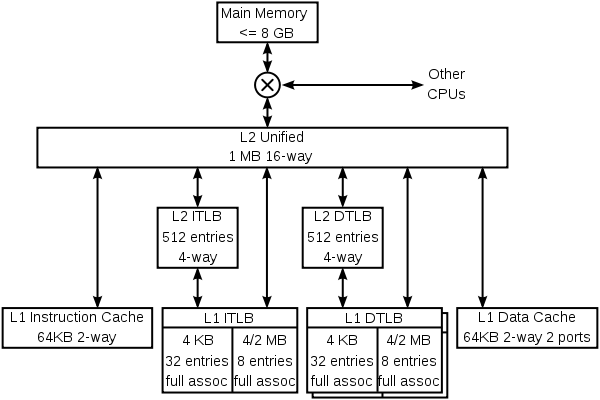
A CPU can execute hundreds of instructions in the time it takes to fetch a single data packet from RAM. However, cache memory makes this data available in nanoseconds. This prevents the CPU from stalling while idle.
Also, high-performance tasks such as 3D rendering and AI inference largely rely on repetitive access to huge datasets. Larger caches are important to minimize the slow trips to system memory. The result is stabilizing frame rates and the export times.
Having an on-chip cache consumes significantly less power than driving signals across the motherboard to RAM. Such is essential for mobile device battery life.
Single-Core vs. Multi-Core Cache
In multi-core systems, L1 and L2 caches are private to each core, while L3 is shared.
Multi-core CPUs use complex protocols such as MESI to ensure that if Core 1 updates a value in its private L1, Core 2’s copy of that data is marked as invalid to avoid calculation errors.
In multi-core chips, the cores must take turns or coordinate when using the shared L3 cache and RAM. This may lead to diminishing returns as the core counts increase.
How Cache Memory is Used in Operating Systems
The operating system plays a key role in managing cache. Here are some of the OS-level caching mechanisms.
Predictive Management
Modern kernels now come with machine learning that helps predict the future data needs more accurately compared to traditional algorithms.
Write Coalescing
In this case, the OS buffers multiple small write operations in memory and then writes them to disk in a single large block. The result is improved efficiency.
Prefetching
The OS also monitors access patterns and proactively loads data it expects the user will need into the memory caches.
CPU Cache vs. Disk Cache
One thing is for sure: both methods are supposed to work as speed buffers. However, they operate at different layers of the system.
CPU cache is hardware-based, and the processor primarily manages it. It is integrated directly into the CPU and stores frequently used machine instructions and data. This bridges the gap between the CPU and RAM.
The operating system manages disk cache. It uses a portion of RAM to store data that has been recently read from or written to secondary storage. The goal of the disk cache is to bridge the massive speed gap between the physical storage and RAM.
Page Cache and Buffer Cache
Operating systems such as Linux and macOS have used these two concepts and merged them into a unified buffer cache.
Page cache stores the actual file data read from disks. Such an activity improves the read/write performance for applications.
Traditionally, the buffer cache stored disk block metadata, including locations and file permissions.
Most modern kernels no longer have separate caches; instead, the page cache handles file data, while raw disk blocks are used for metadata. This has reduced data duplication and memory overhead.
How to Troubleshoot and Optimize the Performance of Cache Memory
It is important to optimize cache performance to ensure high speed suitable for various applications, especially high-performance computing, gaming, and AI.
Here are the main cache memory optimization techniques.
Data Locality
This is where you organize data in contiguous memory blocks, such as arrays, instead of linked lists. Such a design ensures that when an item is fetched, the next several items are already in the 64-byte cache line.
Loop Tiling
Here, you break large data processing loops into smaller titles that fit entirely within the L1 or L2 cache. This prevents the CPU from constantly reloading the data from RAM.
Struct of Arrays vs. Array of Structs
Since now we are dealing with AI workloads, SoA is preferred. It works by grouping similar data types together. This ensures the cache is not polluted with unnecessary metadata during heavy processing.
Software Prefetching
Here, the hardware uses specialized CPU instructions to proactively load data into the cache before the application officially requests it.
Common Cache Performance Issues
Cache Thrashing
This occurs when two or more frequently used data blocks compete for the same cache set. The result is that they repeatedly evict each other, forcing constant RAM access.
False Sharing
This is a common multi-core issue: two cores modify different variables that reside on the same 64-byte cache line. This will force the system to synchronize the cache across cores constantly. The result is reduced performance on overall.
Cold Starts
Expect a significant performance drop when an application first launches or switches tasks. This is because the cache is empty.
Pollution
When large, one-time data transfers, such as copying a large file, overwrite the hot data in the CPU’s cache that other background tasks need.
How to Analyze Cache Performance
The performance of cache memory is measured by looking at the cycles per instruction and the Miss Rate.
The L1 Miss Rate should be less than 5%. High rates suggest poor code structure and random memory access.
The L3 Miss Rate indicates that the working set of an application is too large for the CPU, and the RAM speed bottlenecks the system.
Miss Penalty Impact is calculated as Miss Rate x Latency to RAM. If you find a high number, then it means the CPU is spending too much time stalled.
Conclusion
Cache memory is critical to system performance. A lot has changed over the years in terms of cache memory to the point that it now supports AI processing demands. What is important is to optimize memory and ensure it handles your tasks correctly continuously. You can now expect it to be more than just the size. It is also about intelligence and integration. So, cache memory has evolved from a simple buffer to a more sophisticated management layer.
Please send RFQ , we will respond immediately.
Frequently Asked Questions
Why is cache memory vital to systems?
Cache memory serves as a vital bridge in modern computing by accelerating instruction cycles and decreasing processor idle time. By bypassing frequent requests to the slower system RAM, it significantly enhances the overall efficiency of the hardware.
Where is cache memory located?
Cache memory is a vital memory designed to be inside or very close to the CPU chip. This makes it faster compared to RAM, which is located separately on the motherboard.
What is cache mapping?
The allocation of main memory blocks into cache slots is governed by mapping functions, specifically direct, fully associative, and $n$-way set-associative configurations.