 Upload BOM
 Cart (
 The Complete Guide to Memory Cards: Types, Speeds, and Buying Guide
Author:admin Date: 2026-02-02 07:35 Views:77
Introduction
A memory card is a compact, removable flash storage device used to store digital information. Due to their physical size, memory cards are widely used in portable electronics, including drones, gaming consoles, smartphones, and cameras. They also offer the best durability and ability to retain data even without power. They are the best to provide expandable storage for devices with limited internal storage.
How Memory Cards Work
Memory cards work based on the fundamentals of flash memory and electronic control. The core of the memory card is a NAND flash memory, which is a non-volatile storage. This means it does not need a power source to keep the stored data. The data is stored in the form of memory cells, where each cell holds one or more bits of data.
Another crucial component is the integrated memory controller. This is a tiny processor that manages the complex operations of the card. Its functions include error correction, wear leveling, and interface management.
When data is written to the memory cards, it is the work of the controller to manage the flow of electrical charges into specific NAND memory cells. The change alters the cell’s state in binary, 0s and 1s.
Whenever data is read, the controller sends a request to the cells and reads each cell’s electrical charge level to reconstruct the original data.
As for storage, the data remains stored as electrical charges in the memory cells until it is electrically overwritten or erased.
Different Types of Memory Cards
There are different types of memory cards on the market. It is important to understand how they work to pick the correct one for the application. Here is what to expect.
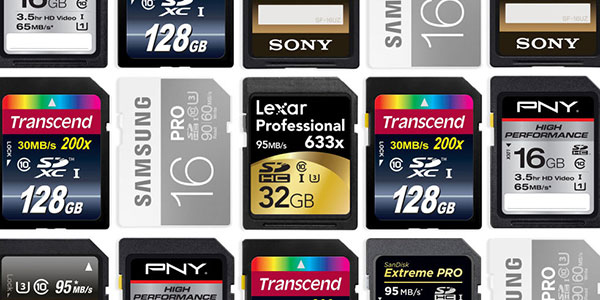
- SD, miniSD, and microSD cards
All these cards belong to the Secure Digital (SD) family and are largely categorized based on their physical size.
SD (standard size) is the largest of the three. It measures 32mm x 24mm x 2.1mm. Expect them in large devices such as laptops, DSLRs, and camcorders.
miniSD is the intermediate size memory card measuring 21.5mm x 20mm x 1.4mm. This format is currently not common, and you would not find it in common devices.
microSD is the smallest and most ubiquitous format you can get today. It measures 15mm x 11mm x 1mm. It is common in smartphones, action cameras, drones, and gaming consoles. They are liked because of their compact size.
- SDHC, SDXC, SDUC
These designations refer to the memory card’s capacity range and required file system, not its physical size.
| Type | Full Name | Capacity range | File system |
| SD | Secure Digital | Up to 2GB | FAT16 |
| SDHC | High Capacity | 4 to 32GB | FAT32` |
| SDXC | eXtended Capacity | 64GB to 2TB | exFAT |
| SDUC | Ultra Capacity | 2TB to 128TB | exFAT |
Memory Card Speed Ratings and What They Mean
The memory card speed ratings can appear confusing sometimes. This is why you have to understand the various speed needs before buying the memory cards. Below, we look at the speed classes so that you can choose appropriately.
Speed Class (C2 to C10)
This was the original standard that was set by the SD Association to guarantee there is a minimum sustained sequential write speed in MB/s. This ensures a basic level of performance for recording videos.
Class 2 (C2): 2MB/s minimum writing speed
Class 4(C4): 4 MB/s minimum writing speed
Class 6 (C6): 6 MB/s minimum writing speed
Class 10 (C10): 10 MB/s minimum writing speed. It is suitable for basic full HD recording.
UHS Speed Class (U1, U3)
The Ultra High Speed (UHS) speed classification was introduced when there was more demand for faster sustained speeds. In this class, you get U1 and U3 options.
UHS Speed Class 1 (U1): This one guarantees a minimum write speed of 10MB/s. This is common in consumer memory cards, and you would use them for general photography and full HD video.
UHS Speed Class 3 (U3): It guarantees a minimum write speed of 30 MB/s. This is a common requirement for 4K video recording.
Video Speed Class (V6 to V90)
This standard was introduced to address extremely high and consistent bandwidth requirements of professional cinema cameras. This is particularly for 4K and 8K video recording, which work with higher bitrates and compression formats.
| Speed Class | Write Speed (MB/s) |
| V6 | 6 |
| V10 | 10 |
| V30 | 30 (required for 4K video) |
| V60 | 60 (required for high-bitrate 4K/6K video) |
| V90 | 90 (required for professional 8K recording and high-speed cinema capture) |
Application Performance Class (A1, A2)
This is a standard that was developed to be used specifically in smartphones, tablets, and other devices running applications directly from the memory card. Running apps need stronger random read and write speeds than just sequential speeds.
A1 guarantees a minimum random read IOPS (Input/Output Operations per Second) of 1500 and a minimum random write IOPS of 500. It also provides sustained sequential speeds of 10 MB/s.
A2 guarantees an even faster random performance. The minimum random read IOPS is 4000, and the minimum random write IOPS is 2000. However, A2 cards require a host device to realize their potential fully.
Memory Card Capacity and File Systems
The capacity can affect the performance and compatibility of the memory card. Large capacity cards often come with more advanced, higher quality NAND flash memory chips and sophisticated controllers. This design is important to maintain faster, sustained write speeds even when using the memory card for longer durations. This is key when shooting RAW photos or high-bitrate 4K/8K video recording.
Smaller cards generally have slower sustained speeds and easily fill their internal buffers faster.
Device compatibility largely depends on the SD standard. The common options are SD, SDHC, SDXC, and SDUC. So, each device is designed to work with a particular standard. Make sure that is what you use when choosing the memory card. Also, the standard determines the file system to use with the memory card.
Memory Card File Systems
There are various file systems you can use on memory cards. The table below outlines each file system and how it compares to the others.
| File system | Typical Capacity Range | Max File Size Limit | Key Uses and Compatibility |
| FAT16 | Up to 2GB (SD standard) | 2GB | Used in very old devices. Compatibility is with legacy systems. |
| FAT32 | 4 to 32GB (SDHC standard) | 4GB | Wide compatibility with most devices and operating systems. However, individual files cannot exceed 4GB. |
| exFAT | 64 to 2TB (SDXC standard) | 16 Exabytes | This is a modern standard that works well for high-capacity flash media. It is ideal for large video files and cross-platform use. |
| NTFS | N/A | Very large | This is the default format for Windows internal hard drives. Not commonly used for memory cards because of the overhead and limited compatibility with non-Windows devices. |
Applications of Memory Cards
Memory cards are quite versatile in terms of applications. You are likely to find them in several devices, where they are used to expand capacity, facilitate data transfer, and add specific recording functionalities.
Below are the common uses of memory cards
- Photography and videography
You will come across memory cards in digital cameras for storage expansion, high-speed capture applications, and action cameras. It is possible you need more storage, especially for shooting high-quality content.
- Mobile devices and computing
In such a case, you opt for memory cards when you need more storage. This is to ensure you have storage for photos, music, apps, and videos. Still, the memory card can be used for data transfer or storing backup files.
- Gaming consoles
Memory cards are not new in the gaming industry. They are largely used for saving games and player data. Modern consoles such as the Nintendo Switch still use high-capacity microSD cards to store digital games, system updates, and expand the console’s limited internal storage.
- Drones and specialized applications
Drones and aerial imaging applications also require memory cards to record high-quality photos and videos while in flight. You can also use the same for surveillance and dashcams as well.
Some portable GPS navigation systems store detailed maps and route information on memory cards for offline access.
Buying Guide: How to Choose the Right Memory Card
Whenever you buy a memory card, make sure it is the right one for you to achieve the best performance. Here is how you choose the best memory card.
Check the Device Compatibility
This is definitely important to keep in mind. Look at the physical size and capacity range that your device supports for memory cards.
The physical size determines whether the memory card fits in your device. Check the device’s manual for the recommended memory card sizes.
The sample applies to the capacity standard. The manual will recommend the capacities to use for optimal performance. Always confirm the device’s maximum supported capacity.
Determine the Required Speed
Speed is vital and affects how well you perform your duties. The slow cards will cause buffering or dropped video frames. Sometimes they can even fail.
Make sure to prioritize the write speed. Most of the time, manufacturers list the read speed, which differs from the write speed. So, consider your application and pick the right memory card with a good write speed.
Also, ensure that your device and card work on the same bus interface. This means you generally get faster performance.
Consider the Right Capacity
Consider your shooting habits and the file sizes you usually work with when choosing the memory card. This helps avoid running out of space during a critical moment.
Casual users can consider 32 to 64GB memory cards. These are usually enough for storing photos and basic HD videos.
4K video and RAW photos need more storage, starting from 128 or 256GB. These are huge files, which means the memory cards fill up quickly.
Professional/shooting content in 8K requires more memory capacity. We recommend starting with 512GB or 1TB to ensure continuity.
Consider Brand and Durability
High-endurance cards are commonly used for dashcams and security cameras. Make sure to choose cards with the “High Endurance” label for such an application, as they can keep recording continuously, even with temperature variations.
Look at getting your memory cards from top brands as well. Examples include Samsung, SanDisk, Lexar, and Kingston. This ensures you get more reliable memory cards and minimizes the risk of data corruption.
How to Identify Genuine vs. Fake Memory Cards
Identifying counterfeit memory cards is a crucial step to prevent future data loss. Here are some tips for checking if the card is genuine or fake.
- Visual inspection and packaging of the memory card are the first things to look into. We recommend only buying from authorized and reputable retailers. Look at the packaging quality. Expect genuine cards to have high-quality, securely sealed packaging.
- Software testing is also recommended. You can use tools such as H2testw, Fight Flash Fraud (F3), and A1 SD Bench to understand the performance of the cards. Testing indicates the card’s actual capacity and speed.
Maintenance and Data Protection on Memory Cards
It is important to maintain your memory cards to ensure there is better data integrity and extend the lifespan of the card.
Some of the best practices for data protection include:
- Always format the memory card in a device or camera. This is because it ensures the file system is correctly set up for that specific device and optimized for storage. Each time you delete the files manually, you may end up fragmenting the memory over time. This slows down the performance.
- Always eject the memory card safely from the card reader or computer if it was mounted or being written onto. Abrupt removal often corrupts the card’s file allocation table, making the data on the card inaccessible.
- Stop using the memory card when it is almost full. It is not recommended to fill the memory card until it is 100% capacity. This is because memory controllers perform best whenever they have some free space to work with. You may notice that if the card is full, the speed is also affected.
- Turn off the device before removing the card. This is for devices such as cameras and smartphones, which should be turned off before you remove the card. This is because you risk interrupting an active read or write process, which may corrupt the data.
Data Recovery and Troubleshooting of Memory Cards
You may have to consider going through several troubleshooting steps if you have a card that is not working well. Here are some of the things to keep in mind in terms of troubleshooting common memory card issues.
- The device does not recognize the card
Start by checking compatibility. Make sure the device supports the card’s format and capacity. For example, an old camera cannot read a 128 GB SDXC card.
Check the lock switch on the card reader. Make sure it is set in the unlocked position so that the device can read the card.
Make sure you get clean contacts for the memory card to work correctly. Clean the contacts using a soft, dry microfiber cloth. Dirt and oil may interfere with the connection.
Try another device or reader. If one reader is not working, try another one to rule out that the memory card is not working. You can also consider another device, such as a computer, to see if it sees the memory card.
- Card Error or Cannot read/write message
It is best for you reformart in-camera. We recommend this process when you have nothing valuable on the card. Yes, formatting the card in the device where the error occurred should fix the file system corruption.
Also, stop using the card immediately to avoid overwriting any recoverable data.
- Files are missing or corrupted
Check for hidden files on the memory card just to be sure. Sometimes a virus or error can hide the files. Enable viewing hidden items to see the files.
Run a check disk utility on the memory card to understand its status. You can use this method for repairing minor file system errors.
Data Recovery Methods
Troubleshooting may fail, but the data is important. In that case, we recommend trying out data recovery methods on the memory card to see how it works. Data recovery tools work best only if you stop using the card immediately after data loss occurs. Here are the solutions for data recovery.
- Software recovery tools
These are tools used to scan the physical memory cells of the file signatures, even when the file system is corrupted. Some of the best software recovery tools to use include Recuva, Disk Drill, SanDisk RescuePro, and R-Studio.
- Professional data recovery services
You will also come across companies that specialize in data recovery services. Only hire one when the data is highly valuable and the card has physical damage. These services might cost more, but it is because the work required to recover the data is highly technical.
Also, we recommend that you back up data regularly. Always transfer the important data to other reliable data storage options as soon as possible. Still, do not skimp on quality. Always buy memory cards from top brands. Some cheap generic cards can fail without a warning.
Conclusion
Memory cards are vital in modern digital life. They have evolved into sophisticated, high-speed recording mediums for various devices. Make sure to consider the physical size, capacity, and speed rating when picking memory cards. Using the appropriate cards and following the best practices, ensuring you do not lose your data and get the best performance as well. Pick from top brands if you want peace of mind that the memory card will always work.
Please send RFQ , we will respond immediately.
Frequently Asked Questions
Can you use a microSD in an SD card slot?
Yes, but you need to use a microSD-to-SD adapter. These adapters make it possible for the smaller microSD cards to be compatible with devices that use standard SD cards. However, the speed depends on the microSD card you have chosen.
What can cause memory cards to get corrupted?
The common causes include removing the memory card while the data is being written, power loss during transfer, using poor-quality or counterfeit cards, physical damage, or virus and malware infections on the connected devices.
How can you recover data from a corrupted card?
Stop using the card immediately. Use a recovery software like Recuva, EaseUS Data Recovery, or Disk Drill. You can still contact a professional recovery service for critical data.


