 Upload BOM
 Cart (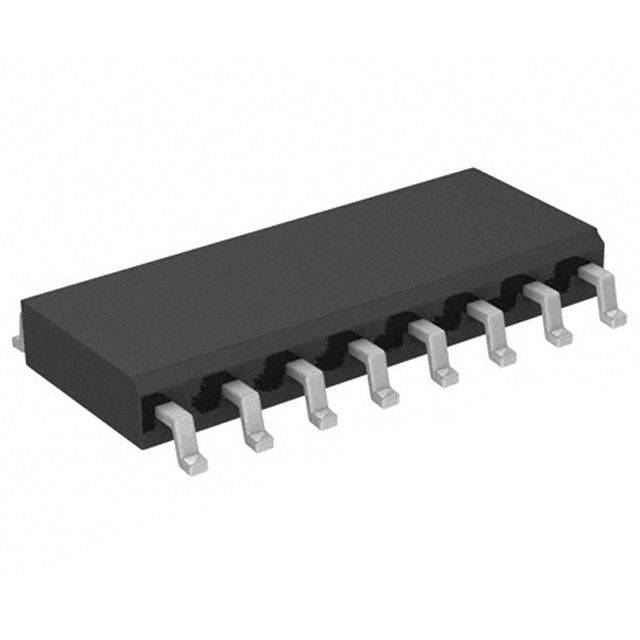
74HC595D datasheet & pdf | price
- Brands: Toshiba Semiconductor and Storage
- Download: 74HC595D Datasheet PDF
- Price: inquiry
- In Stock: 15
- Logic Type: Shift Register
- Output Type: Tri-State
- Number of Elements: 1
- Package: 16-SOIC (0.154, 3.90mm Width)


FREE delivery for orders over HK$250.00

Quick response, quick quotaton

Flash shipment,no worries after sales

Original channel,guarantee of the authentic products
How to cascade 74hc595 shift register
74HC595D
The 74HC595D is a handy 8-bit shift register that makes it easy to expand the number of outputs on your microcontroller. It takes in data one bit at a time (serially) and then spits out 8 bits of data all at once (parallel). This makes it great for controlling things like LEDs or displays.
It also has a latch function, which means it can hold the data on the output pins without constantly refreshing. This keeps things stable.
The chip includes output drivers that can handle up to 6mA per pin, so it’s useful for driving medium-power devices like LEDs. You’ll use three main pins: the Clock Pin (SH_CP) to shift the data, the Latch Pin (ST_CP) to update the outputs, and the Data Pin (DS) to feed in the serial data.
It’s low power, runs on voltages between 2V and 6V, and is perfect for all kinds of projects.
74HC595D Pinout Explanation

| Pin Number | Pin Name | Description |
|---|---|---|
| 1 | QB | Output pin B (shift register output) |
| 2 | QC | Output pin C (shift register output) |
| 3 | QD | Output pin D (shift register output) |
| 4 | QE | Output pin E (shift register output) |
| 5 | QF | Output pin F (shift register output) |
| 6 | QG | Output pin G (shift register output) |
| 7 | QH | Output pin H (shift register output) |
| 8 | GND | Ground |
| 9 | QH’ | Serial output (cascade output) |
| 10 | SCLR | Shift register clear (active low) |
| 11 | SCK | Serial clock input, data entered on rising edge |
| 12 | RCK | Storage register clock input, latches data on rising edge |
| 13 | G̅ | Output enable (active low) |
| 14 | SI | Serial data input |
| 15 | QA | Output pin A (shift register output) |
| 16 | VCC | Positive supply voltage (typically 5V) |
The 74HC595D is an 8-bit serial-to-parallel shift register you’ll often use for driving LED arrays or expanding microcontroller IO pins. When you hook it up, make sure your clock signals—like serial clock (SCK) and register clock (RCK)—are correctly connected, ensuring smooth data transfer. There’s also a handy pin called QH’, meant for cascading multiple chips if you need even more outputs. Two more pins to watch out for are the G pin, controlling output enable, and the SCLR pin, which quickly clears outputs. Both activate on a low-level signal, so keep their states correct to avoid unexpected outputs.
74HC595D Equivalent Shift Register


| Feature | 74HC595D | 74LS164 | CD4021BE | SN74AC595 |
|---|---|---|---|---|
| Package Type | DIP-16, SOIC-16 | DIP-14, SOIC-14 | DIP-16, SOIC-16 | DIP-16, SOIC-16 |
| Operating Voltage | 2V to 6V | 4.5V to 5.5V | 3V to 15V | 4.5V to 5.5V |
| Max Output Current | 6mA per pin | 8mA per pin | 8mA per pin | 6mA per pin |
| Shift Register | 8-bit | 8-bit | 8-bit | 8-bit |
| Latch Function | Yes | No | Yes | Yes |
| Clock Pin | Yes | Yes | Yes | Yes |
| Data Pins | 8 (Q0 to Q7) | 8 (Q0 to Q7) | 8 (Q0 to Q7) | 8 (Q0 to Q7) |
| Serial Input | Yes (DS pin) | Yes (Serial Input) | Yes (Serial Input) | Yes (DS pin) |
The 74HC595D is a great all-rounder, with an 8-bit shift register and a latch, perfect for most projects. It keeps the output stable, which makes it reliable for general uses.
If you don’t need the latch function, the 74LS164 might be a good fit. It’s also an 8-bit shift register, but it shifts data continuously without storing it. It can handle more power with 8mA output, so it’s better for higher-power applications.
The CD4021BE is a solid option for higher voltage circuits, with a wider voltage range (3V to 15V) and also includes the latch function.
For faster operations, the SN74AC595 is your go-to. It’s similar to the 74HC595D but built for speed and higher voltage, making it great for applications needing quick shifts.
74HC595D Shift Register Circuit Example

When you’re working with the 74HC595D shift register and Arduino, it’s a great way to control multiple LEDs with just a few pins. The 74HC595 lets you send serial data through its SER pin to control up to 8 LEDs. You connect the Arduino pin (usually pin 11) to this SER pin. The SCLK pin, hooked up to the Arduino’s clock pin (like pin 12), shifts the data in, and the RCLK pin latches the data to the LEDs. Each LED is connected to one of the shift register’s output pins (Q0 to Q7), and you control the brightness or on/off states with those. It’s powered by the Arduino’s 5V, making the whole setup simple and efficient. This way, you expand your output without needing tons of extra pins.
74HC595D Cascading Wiring Diagram

When you cascade the 74HC595D shift registers, you can control more LEDs with just a few microcontroller pins. The first shift register’s QH’ pin connects to the second one’s DS pin, passing data along the chain. This way, you can control up to 16 LEDs with two registers. The microcontroller sends data to the registers through the data pin, shifts the data with the clock pin, and latches the data with the latch pin to turn the LEDs on. The shift registers are powered by 5V, and a 1µF capacitor helps stabilize the power supply. Cascading is a neat way to expand your outputs while keeping the microcontroller pins free for other tasks. It’s perfect for projects where you need to control a lot of devices without using too many pins.
74HC595D Arduino LED Matrix Project
If you’re trying to set up a 74HC595D shift register to control an LED matrix with your Arduino, here’s a simple way to get started. You’ll connect the shift register to the Arduino, using just a few pins. For wiring: connect the SER pin to pin 11 on your Arduino, SCLK to pin 13, and RCLK to pin 8. The output pins (Q0 to Q7) will connect to the columns of your LED matrix. Use 220Ω resistors for each LED to keep things safe. Then, power it all with the 5V from the Arduino. In your code, use the shiftOut() function to control the LEDs, and you can create animations or patterns. This setup is great because it reduces the number of pins you need on your Arduino, but still gives you full control over a big LED matrix.
More Like This

MC5430F
Motorola

JD54LS51BCA
National Semiconductor

USPLSI2032VE-110LB49
Lattice Semiconductor Corporation
74S22PC
Rochester Electronics, LLC

9504DC
National Semiconductor

9005PC
National Semiconductor
9007DC
National Semiconductor
9004DC
National Semiconductor

SN74HC804DWR
Texas Instruments
SN700863DWR
Texas Instruments
4001BDMQB
National Semiconductor
54F02FMQB
National Semiconductor
Also Add to Cart
NCP4306AAHZZZADR2G
onsemi
LMK00304SQ/NOPB
Texas Instruments

LTC4281CUFD#TRPBF
Analog Devices Inc.

8N3QV01KG-0130CDI8
Renesas Electronics America Inc

SI32170-B-GM1R
Skyworks Solutions Inc.

TPS2373-4RGWR
Texas Instruments
SY733021UZG
Microchip Technology
74VHC244D,118
Nexperia USA Inc.
TLE9104SH
Infineon Technologies

74ABT244CMSA
Fairchild Semiconductor

IRU3048CSTR
Infineon Technologies
SIT82C251T
SIT
Related Products
MC5430F
Motorola
JD54LS51BCA
National Semiconductor
USPLSI2032VE-110LB49
Lattice Semiconductor Corporation
74S22PC
Rochester Electronics, LLC
9504DC
National Semiconductor
9005PC
National Semiconductor
9007DC
National Semiconductor
9004DC
National Semiconductor
SN74HC804DWR
Texas Instruments
SN700863DWR
Texas Instruments
4001BDMQB
National Semiconductor
54F02FMQB
National Semiconductor
DM54S20W/883
National Semiconductor

MC3129L
Motorola
4071BDM
National Semiconductor
MC9814P
Motorola
MC9825P
Motorola

74AC11000NS
Texas Instruments
MC5420L
Motorola
MC5401L
Motorola
MC5401F
Motorola
SN74H61N
Texas Instruments
MC5410F
Motorola
MC5430L
Motorola
SN74AS138N-J
Texas Instruments
CD4023BCN
Fairchild Semiconductor
4019BDC
National Semiconductor
74H40DC
National Semiconductor
5420FMQB
National Semiconductor
4025BDM
National Semiconductor
Please send RFQ , we will respond immediately.
